No items in cart
Buy 2 Get 1 Free
Add 3 products to the cart and get the cheapest for free at checkout.
Add 3 products to the cart and get the cheapest for free at checkout.

FOR IMMEDIATE RELEASE:
Hands-on delay with an analog flavor. Audio plugin for Mac and PC.
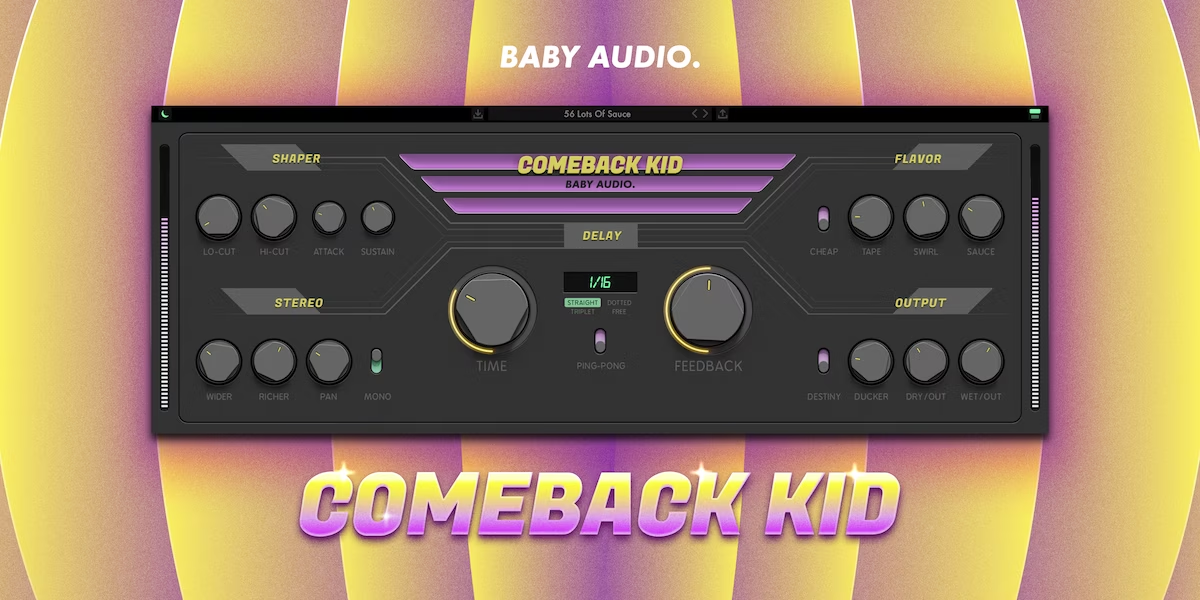
Comeback Kid lets you design custom delay sounds loaded with analog flavor. The plugin combines a powerful delay engine with 14 'one-knob effects' that each add their own unique character to your delays and echos.
The effect lay-out is inspired by the creative workflow of hardware. With no sub-menus or hidden features, everything you need is right in front of you. So grab the knobs and start tweaking your delays to the next level!
Inspired by our Super VHS plugin, Comeback Kid offers a flexible palette of one-knob effects to take full control of your delay signal. And with no sub-menus or hidden features, everything you need is right in front of you. Even some inspiration:
The plugin comes loaded with 61 presets created by friends of Baby Audio - including:
Mac & PC, VST, VST3, AU and AAX, 64-bit and 32-bit. Compatible with all major DAWs.
For video and image assets, manual and additional info, please visit: https://babyaud.io/comeback-kid-delay-plugin
BPM-synced modes: Straight, dotted, triplet. Free mode: 0.01 ms - 2500 ms. Ping-Pong option.
Disable the delay engine by double clicking the logo. This lets you use CK as a powerful Multi-FX.


.png)