No items in cart
Buy 2 Get 1 Free
Add 3 products to the cart and get the cheapest for free at checkout.
Add 3 products to the cart and get the cheapest for free at checkout.

Our first ever plugin was conceived in New York in 2019. It was based on an appreciation for the drum “pump” and “squash” that could be achieved with certain cheap second hand compressors. We didn’t know the first thing about running a plugin company back then, but we had to start somewhere. So we started in a 1-bedroom apartment on E 22nd Street – with the idea to create a simple plugin for replicating the “New York Parallel Compression” trick.
It was inspired by our favorite hardware compressors, but we wanted it to have a slightly more polished and modern sound. That was “I Heart NY” – and the birth of Baby Audio.
Although it’s only been 3 years, so much has happened since then. With the Covid lockdowns, we relocated back to Europe and honed in on the craft of making plugins with a singular, obsessive focus. It’s made 3 years feel like half a lifetime!
We’re in a much different place today. Both in terms of our vision and our ability. So for our anniversary, we thought it would be fun to revisit our very first plugin and update it with everything we’ve learned since starting out.
With IHNY-2 we revisit an old friend, I Heart NY. Although it’s only a plugin, it feels oddly nostalgic! But its successor is everything we ever hoped for I Heart NY to be back in that 1-bedroom apartment. And so much more.
We developed IHNY-2 with a mission to make the hardest hitting compressor in the industry. It SLAMS – but without destroying your audio. If you like your drums to sing and ring, this plugin will make you feel like you’ve finally arrived home!
Welcome to IHNY-2—a punchy parallel compressor built for the classic “New York Compression” sound.
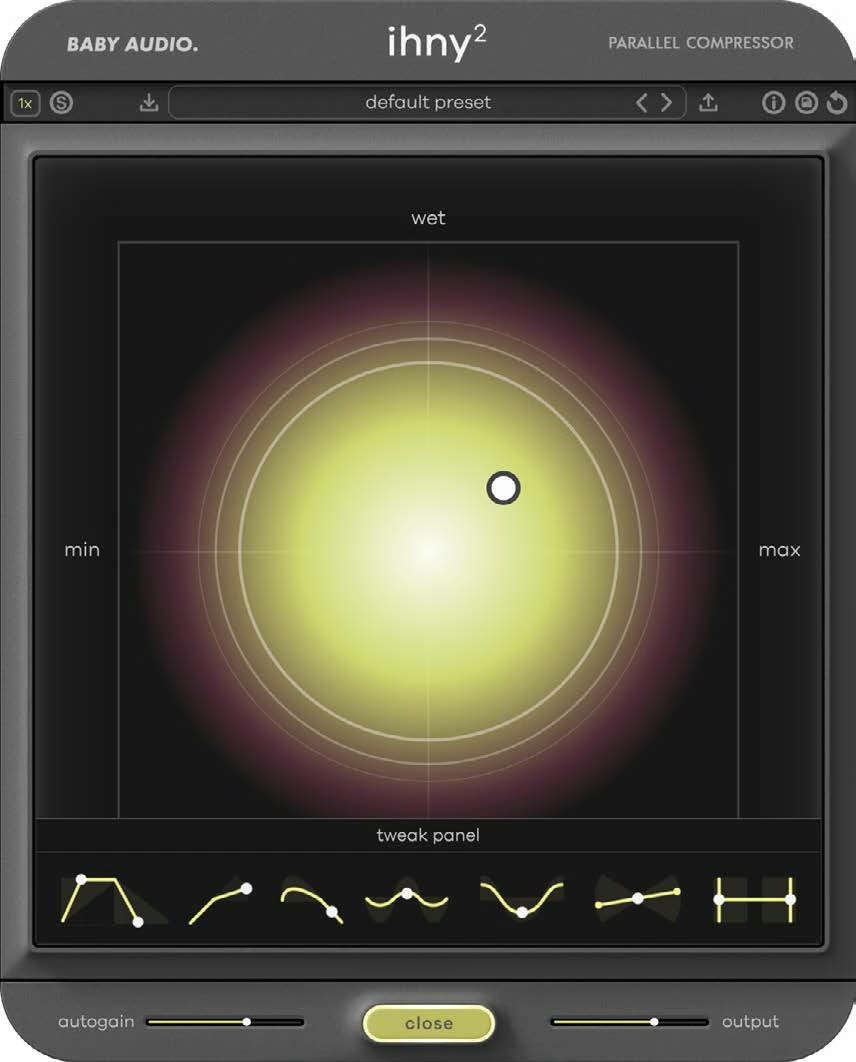
To get started, insert IHNY-2 on a drum bus or any track you want to add punch and weight to. Drag the node on the XY pad: the horizontal axis sets the amount of compression on the wet signal, and the vertical axis sets the balance between the wet and dry signals.
Keep an eye on the AGR value as you move the node. For a good starting point, aim for AGR levels between -10 and -20. An autogain algorithm keeps the output level consistent as you move around the pad; use the Autogain slider to nudge it if the result is too loud or too quiet.
When you want more control, open the Tweak panel to adjust the attack, release and ratio of the compressor, bring back transients with Punch, add saturation with Harmonics and shape the tone with Shape and Tilt.
Put IHNY-2 on your drum bus and push the node toward heavy compression, then pull the wet/dry balance back until the drums pump and slam without losing their natural dynamics. Engage Shape for a classic smiley EQ curve that pairs perfectly with heavyNew York style compression.
Use Lo-Preserve to keep the low frequencies out of the compressor so the kick stays clean and punchy while the rest of the kit gets squashed.
Add parallel compression to vocals, bass or guitars for extra density and sustain. Add Harmonics for saturation that responds to how hard the signal is being compressed.
Engage Solo to monitor only the wet signal and use IHNY-2 as a regular insert compressor, with Punch on hand to keep transients intact at high compression levels.
IHNY-2 hosts a parallel signal chain internally. It splits the incoming audio into two duplicates. One remains untouched by the plugin (Dry track), the other is subjected to all the goodness IHNY-2 has to offer (Wet track).
You balance the two signals on the vertical axis of the XY pad, while setting the compression amount of the Wet track on the horizontal axis. This allows you to operate the most important controls of the plugin in just one motion.
IHNY-2 has an autogain algorithm working under the hood to give you a consistent output as you move the node around the XY pad – but if you find that it’s too loud or too quiet, you can use the Autogain slider on the front panel to nudge the behavior.
While moving the node around the XY pad, you’ll see a value displayed under the “AGR” abbreviation (Adjusted Gain Reduction). This number takes into account the current gain reduction and dry/wet balance to give you a value for the compression intensity. For a good starting point, we recommend you aim for AGR levels between -10 and -20.
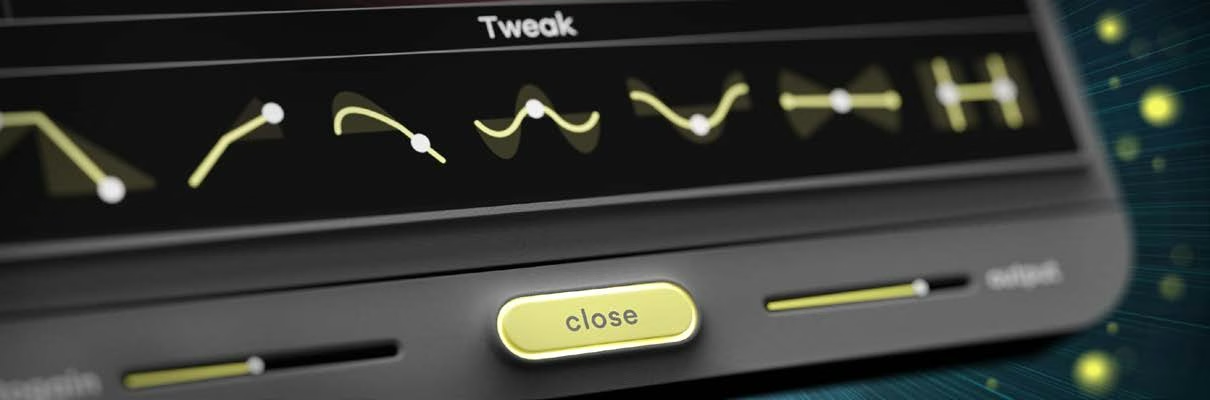
IHNY-2 is meant to be as fast and intuitive as its predecessor. But if you need to go deeper, the Tweak panel gives you full control over the compressor. Here, you’ll find a number of new features that weren’t included in V1.
Sets how fast the compressor engages and disengages.
Sets the compression intensity from mild to aggressive.
Heavy compression tends to suck the transients out of a signal. The Punch control works to emphasize attack transients in the compressed track, helping it cut through even at very high compression levels.
Imagine a saturator that behaves like a compressor – that’s Harmonics. This feature introduces harmonic saturation controlled by the gain reduction, meaning more compressed parts get saturated harder.
Adds our custom ‘smiley EQ curve’ to bring out the lows and highs and make the compressed signal more present. (The smiley EQ curve is what sets “New York Compression” apart from regular parallel compression. IHNY-2 can do both.)
Makes the compressor work harder on either the low or high end of your signal – which can be useful for controlling bass heavy material and letting the high end breathe (or vice versa).
Prevents the low and high frequencies from being compressed above/below the cutoff points. For instance, this is a great way to preserve the kick while squashing the rest of your drum bus.
Run the plugin in 1x, 2x or 4x oversampling modes. Oversampling brings more clarity and eliminates aliasing – but also comes at the expense of higher CPU usage. We recommend 1x for mixing and 2x or 4x for mastering purposes.
Monitor the wet signal in solo. Useful for finetuning – or for using IHNY-2 as a regular insert compressor.
Turn on to get explanations of each parameter as you use the plugin.
Save your own default preset, which will load whenever you open a new instance of IHNY-2, by clicking the “cartridge” icon. Reset the plugin to your default preset by clicking the “reset” icon.
Bypass the plugin by clicking the Baby Audio logo.
Resize the plugin by clicking and dragging the lines in the bottom right corner.
IHNY-2 comes loaded with 156 presets from Baby Audio and friends of the house. We want to thank all of our amazing preset creators:
Download instructions are emailed to you right after your purchase, however you can always go to www.babyaud.io/account for the latest software updates. After downloading, unzip the file and select either Mac or PC depending on your system.
If you have an active subscription to the Plugin Collection Plan, IHNY-2 will appear in your Baby Audio Manager app for download.
Make sure your machine is registered, get the software by clicking ‘Download’ and follow the instructions to install.
Activate your software by entering the license key that was provided in your account when you bought IHNY-2. Serial keys are entered in the ‘trial mode’ open screen. If you have any problems activating, please email support@babyaud.io.
If you’re running IHNY-2 in trial mode, please note that the trial will output 5 seconds of silence every 60 seconds. To buy the full version, go to: https://babyaud.io/ihny-2
Please read our End User License Agreement here: babyaud.io/eula
Have fun using IHNY-2! If you run into any issues or have questions along the way, you can always contact us at support@babyaud.io.


.png)