No items in cart
Buy 2 Get 1 Free
Add 3 products to the cart and get the cheapest for free at checkout.
Add 3 products to the cart and get the cheapest for free at checkout.

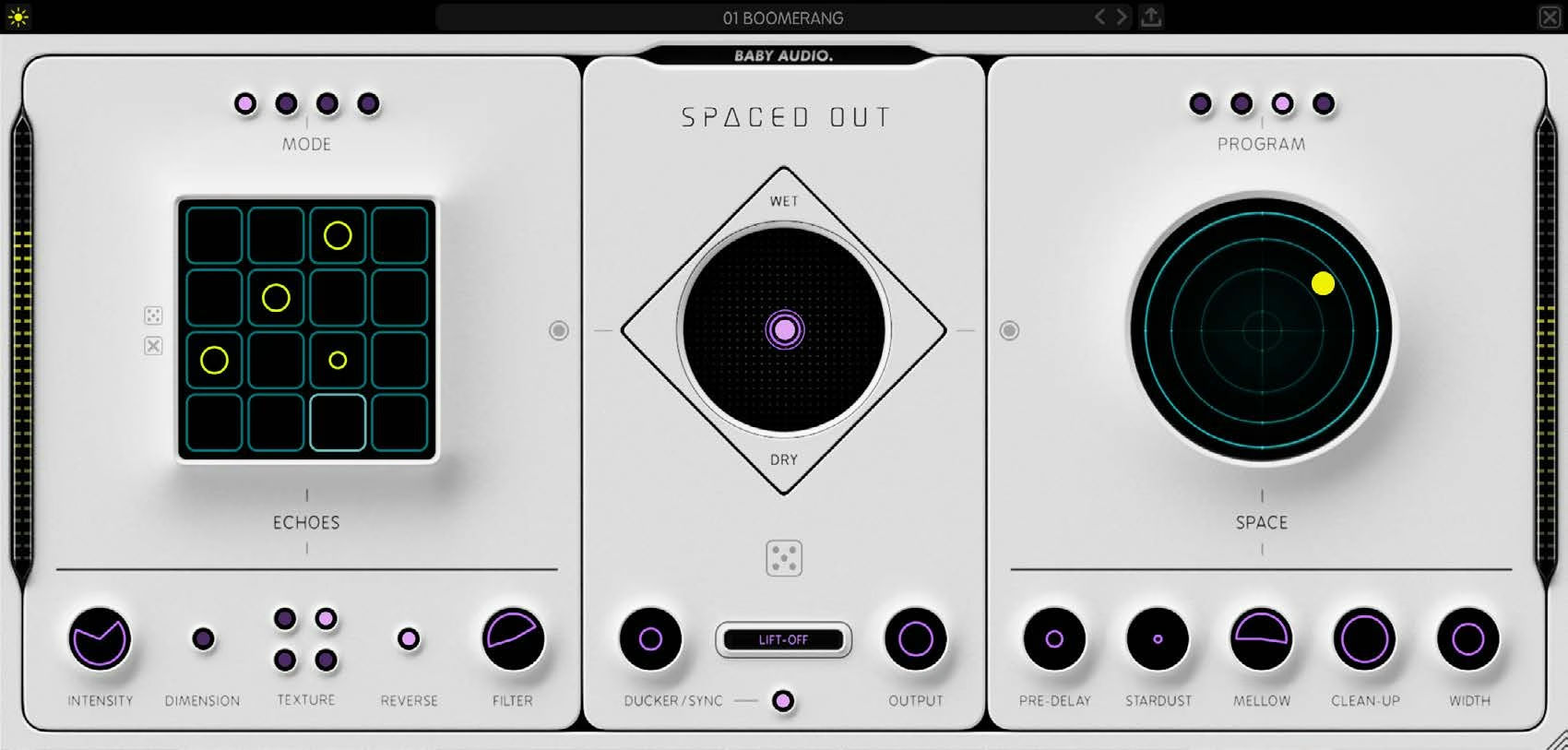
It is no secret that we at Baby Audio are obsessed with the quirks, sounds and simplicity of vintage analog gear. With every software product we make, we hope to offer a little bit of that same hands-on experience and instant gratification. Never by emulating the past — but by tapping into its spirit to invent something new.
With Spaced Out, we asked ourselves this: How would we design a “Space Echo” effect today, almost 50 years after the original, with the abundance of computer power and algorithmic complexity at our disposal?
We set out to create an effect as fun, flavored and futuristic for the 21st century as the Space Echo was for its own time. It’s been an epic journey and we’re proud to have returned with our most complex plugin to date!
Spaced Out is a lush wet-FX generator, built for sending your sounds and vocals into weightless, heavenly orbit. It combines a crystalline reverb engine with a wealth of modulation options and a 16-step delay sequencer. In total, more than 50 individual effects come together in a singular creative experience with endless outcomes and zero sub-menus.
Welcome to Spaced Out—a dreamy wet-FX plugin that combines a sequenced delay and a modulated reverb in a single interface.
Spaced Out is built around two effect engines and a central mixer. The Echoes engine on the left is a 16-step delay sequencer, and the Space engine on the right is a hybrid reverb/modulation effect.
To get started, insert Spaced Out on any track and drag the X-Y joystick in the central mixer to morph between the Echoes engine, the Space engine and the dry signal.
Click the steps in the Echoes grid to build a delay pattern, or click the dice icon to generate one. Choose a rhythm with the Mode buttons and a delay flavor with Texture.
In the Space engine, drag the middle circle to choose a modulation effect, set its intensity and adjust the reverb length in one movement. Choose a reverb program to set the size of the space.
Need inspiration? Click the dice icon in the mixer to generate a random configuration, then fine-tune the result with the X-Y joystick.
Finally, use the Ducker to keep the wet signal out of the way of your dry track and engage Lift-Off to glue both engines together.
Blend a gentle Echoes pattern with a Lush or Cosmic Space setting to send vocals into orbit. Engage the Ducker so the effects swell between phrases and stay clear of the lyrics, and add a touch of Stardust for an airy shimmer on top.
Program custom delay rhythms on the 16-step grid and switch between Straight, 2x, Dotted and Triplet modes for anything from tight slapback to syncopated, bouncing repeats. Use Low Accent steps to add ghost-note echoes between the main hits.
Switch the Echoes Texture to Wonky Tape, Lofi or Hazy for warbly, worn-out repeats with plenty of character. Shape the tone of the delays with the Filter to sit them back in the mix.
Push the X-Y joystick toward the Space engine, choose the Outer Space program and dial in a long reverb with the Trippy or Alien modulation for evolving, otherworldly pads and soundscapes.
Turn on Ducker Sync to duck the wet signal on every quarter note for a classic four-on-the-floor pump, perfect for dance tracks where the effects should breathe with the beat.
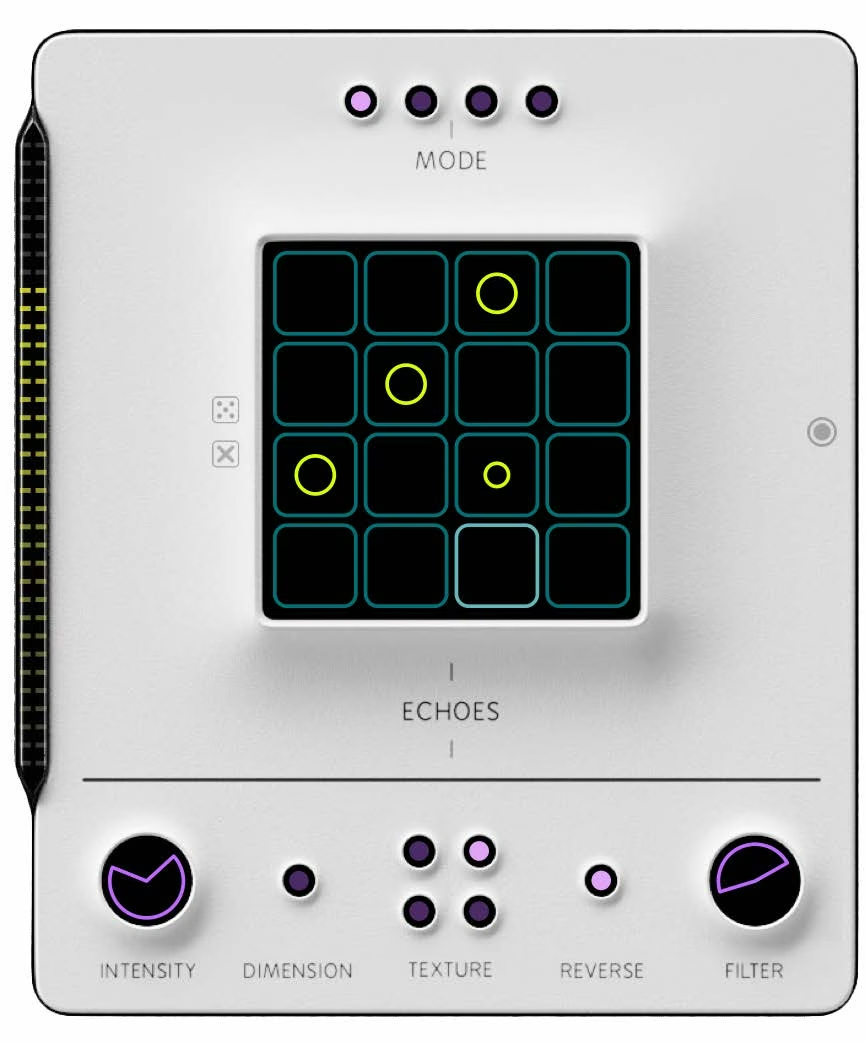
The Echoes engine consists of 16 individual tap delays, synced to the DAW’s BPM. Each delay line can be either OFF, ON or LOW ACCENT (engaged, but with a lower/filtered output).
Click inside the windows to enable or disable any step, or use the dice icon to auto-generate a pattern. You can always clear the entire sequencer by clicking the “x” icon.
Add sustain (left handle) to increase the volume of the later steps in the delay sequencer. This will give you a more dense output.
Add feedback (right handle) to increase the amount of repeats of each delay line.
Toggle between OFF (no stereo effect), Ultra-Wide (stereo widener) or Motion (auto-panning function).
Switch between Clean, Wonky Tape, Lofi and Hazy. Each of the textures utilizes a number of under-the-hood effects, calibrated to create four distinct delay flavors.
Reverses the delay signal.
Analog-modeled HPF (left handle) and LPF (right handle) to shape the tone of the delay signal.
Sets the time signature. Toggle between Straight, 2x (twice as fast as Straight), Dotted and Triplet modes.
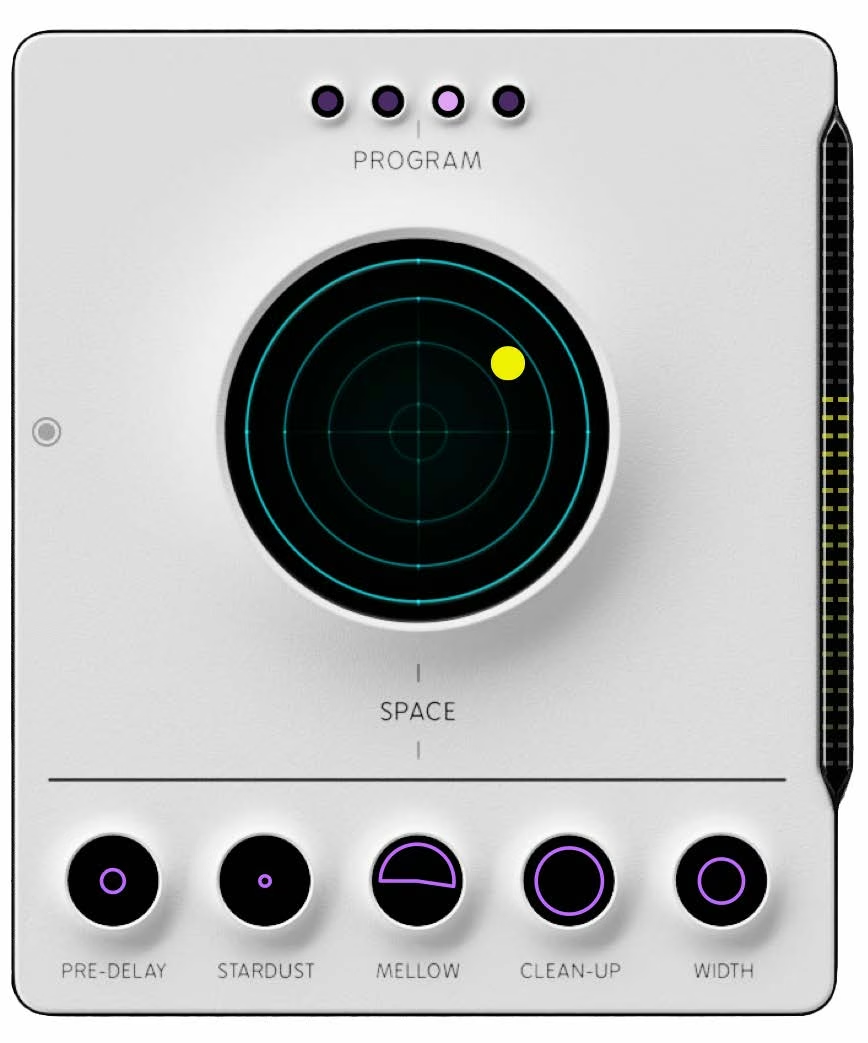
The Space engine is a hybrid reverb/modulation effect. Its foundation is an algorithmic reverb, designed from the ground up to sound transparent, modern and ‘crystalline’.
Four unique modulation effects – Lush, Trippy, Alien and Cosmic – have been baked into the reverb algorithm so you can add a touch of their character to your reverb and achieve some dreamy, otherworldly results.
The middle circle lets you set three parameters in one mouse movement:
Delays the reverb signal by 0–250 ms.
Creates an angelic, high frequency shimmer effect. We know you want more details about this one, but not everything that can be heard also needs to be understood! It would take away some of the magic :)
HPF (left handle) and LPF (right handle) for shaping the reverb tone.
Decreases the reverb density for a more “lightweight” sonic signature. This is achieved by feeding the reverb algorithm with an altered dry signal.
Sets the reverb width between stereo and mono.
Four distinct reverb programs: Vacuum, Small Space, Medium Space and Outer Space.
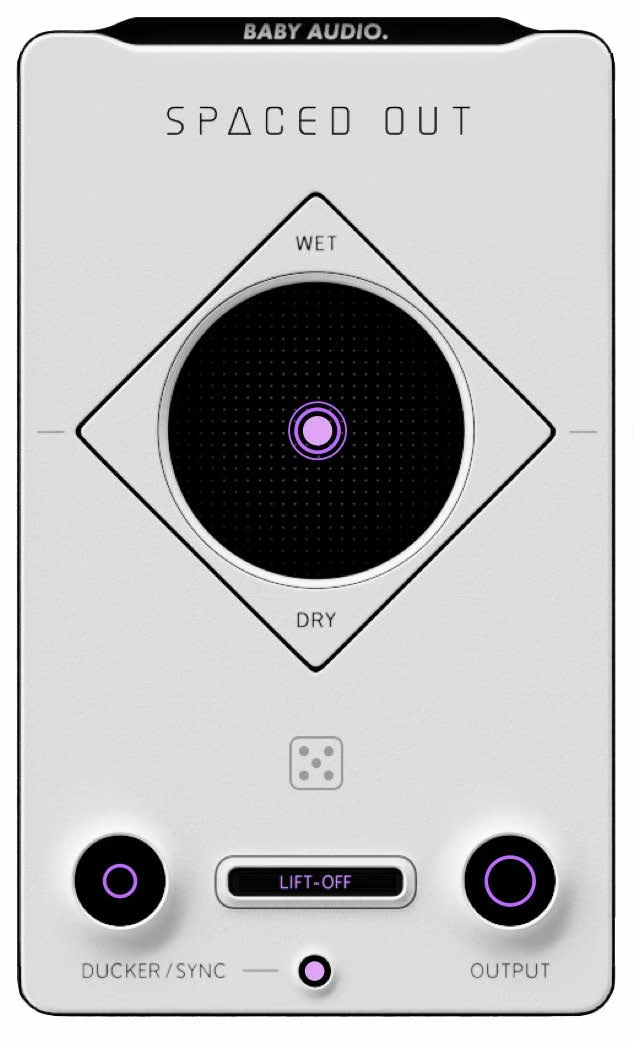
The central mixer hosts a universal X-Y joystick control that lets you morph between both wet-FX engines and the dry signal in one seamless motion.
The Generate function (dice icon) will create random effect configurations to get you a quick starting point. This feature has been optimized and musically calibrated to give as usable results as possible – and quite often, you may find that you just need to move the central X-Y joystick after clicking the dice a few times. If that’s how you prefer to work, we don’t blame you: Spaced Out can be exactly as fast or as deep as you want it to be!
The ducker is a sidechain effect that lowers the wet signal according to another signal’s input. When Sync is OFF, the Ducker is linked to the dry signal and will lower the wet-FX when the dry signal is playing. With Sync ON, the ducker syncs to quarter notes on the DAW’s grid, effectively giving you a ‘four on the floor’ sidechain effect.
Engages a number of effects collectively to “glue” together the wet-FX signals. This includes compression, mid-side processing and some joint EQ’ing.
Controls the output of the entire effect (wet + dry signals).
Choose between light mode and dark mode by clicking the top left icon in the preset bar.
Resize the plugin window by clicking and dragging the stripes on the lower right side.
Click the preset name for a dropdown list, or click the arrows in the preset bar, to navigate between the presets. Click the “arrow up” icon on the preset bar to save a preset.
Click the top right icon (“x”) to clear all settings and return to the initialization state.
Click the Baby Audio logo to bypass the effect.

The input feeds the Echoes and Space engines in parallel, with the dry signal running alongside them to the Mix stage.
In the Echoes engine, the signal passes through Mode, Reverse, the 16 tap delays, the HP and LP filters, Feedback, Sustain, Dimension and Texture.
In the Space engine, it passes through an EQ curve, the reverb Program, Clean-Up, Stardust, the HP and LP filters, the modulation effect, Length, a second EQ curve, Width and Pre-Delay.
Both engines then merge at Lift-Off and continue through the Ducker (with Sync on or off) to the Mix and Output.
Spaced Out comes loaded with 125 presets.
Preset creators:
Download instructions are emailed to you right after your purchase, however you can always go to www.babyaud.io/account for the latest software updates. After downloading, unzip the file and select either Mac or PC depending on your system.
If you have an active subscription to the Plugin Collection Plan, Spaced Out will appear in your Baby Audio Manager app for download.
Make sure your machine is registered, get the software by clicking ‘Download’ and follow the instructions to install.
Activate your software by entering the license key that was provided in your account when you bought Spaced Out. Serial keys are entered in the ‘trial mode’ open screen. If you have any problems activating, please email support@babyaud.io.
If you’re running Spaced Out in trial mode, please note that the trial will output 5 seconds of silence every 60 seconds. To buy the full version, go to: https://babyaud.io/spaced-out-plugin
Please read our End User License Agreement here: babyaud.io/eula
Have fun using Spaced Out! If you run into any issues or have questions along the way, you can always contact us at support@babyaud.io.


.png)