No items in cart
Buy 2 Get 1 Free
Add 3 products to the cart and get the cheapest for free at checkout.
Add 3 products to the cart and get the cheapest for free at checkout.

%20(1).png)
Granular synthesis uses existing audio as the raw material to synthesize new sound.
It’s one of the most recent methods of synthesis to be developed in the digital audio production era and it offers producers a whole new paradigm for sound design.
But what is granular synthesis exactly? How does it work and how can you use it in your own music?
In this article I’ll break down the basics of granular synthesis, explain how to get the best results from granular plugins and suggest four production ideas to inspire your own workflow.
Let’s get started.
Granular synthesis is a method for generating sound by breaking an audio file down into fragments called grains and reassembling them to create new textures.
While the size of each grain can vary according to the settings of your particular granular synth, small grains, sometimes only a few milliseconds long, are often used as the basis for granular sounds.
By varying the rate, position, direction and other features of the generated grains, you can transform any source material into a unique new sound with traces of the original—or make it completely unrecognizable.
Granular synthesis is only possible in the digital domain since it relies on the discrete information within a digital audio file to create its sound.
As a result, there are many granular synths available as software plugins as well as a few notable hardware instruments that perform granular synthesis in standalone form.
Today there are dozens of granular synth options to choose from, including Grainferno, our latest and most advanced synth plugin to date.
Grainferno builds on new concepts like audio-rate grain generation to expand the possibilities of granular synthesis even further—more on that later!
As I mentioned above, all granular synths start with an audio file as the source material to be deconstructed into grains.
Any audio file can be used, but different source sounds can lead to wildly different outcomes.
For example, field recordings of natural environments are often a favorite choice for granular synthesis, since they juxtapose real world sounds with dramatic digital textures from granular processing.
But any sound can be used as a starting point for granular synthesis. Part of the fun is experimenting with different sounds to see how they impact your final results.
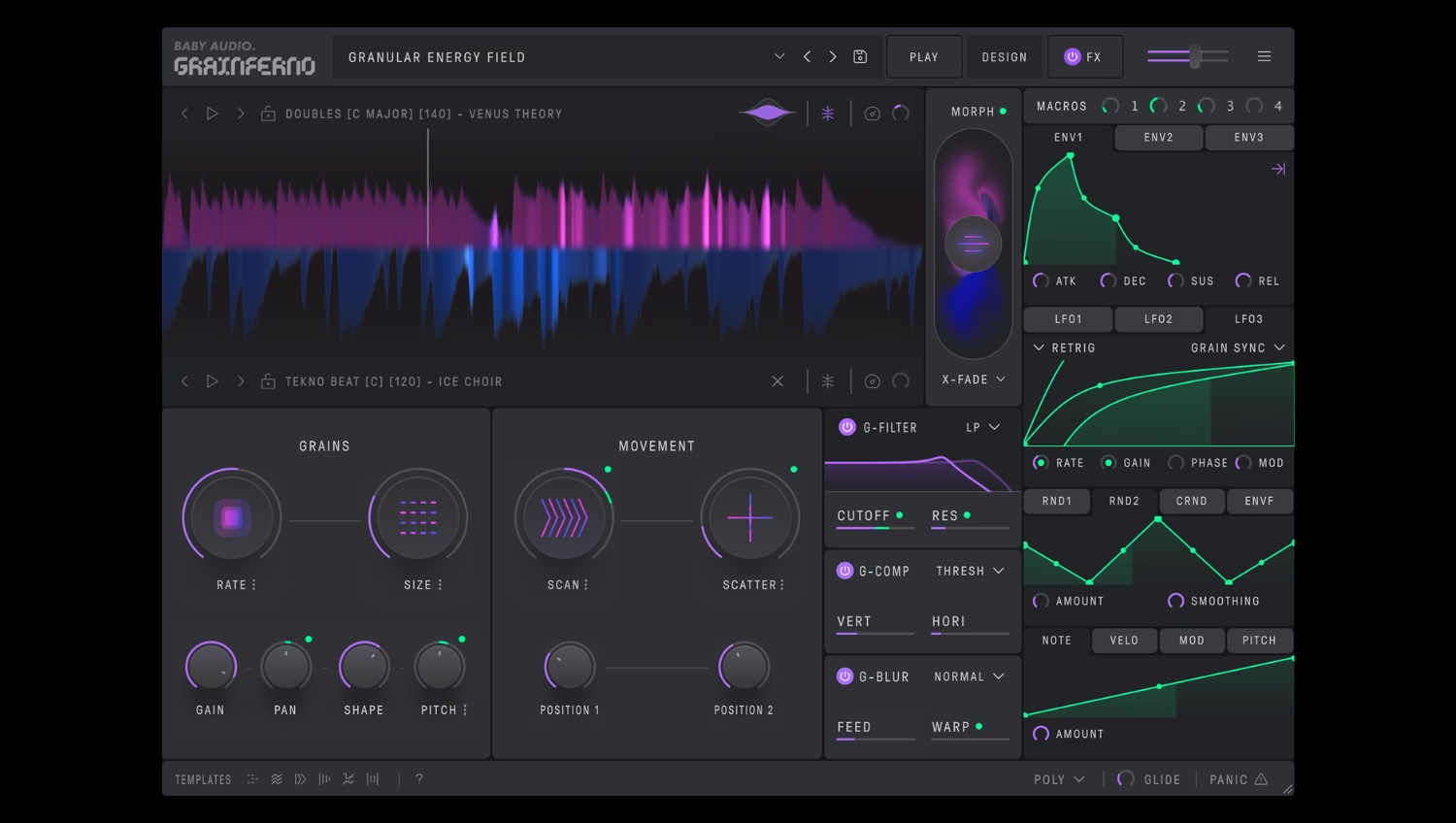
The grain generation rate is one of the core mechanisms in Grainferno and many other granular synths.
Rate determines how fast new grains will be generated from starting form the set position within the source sample.
At slow rate settings, individual grains can be heard as they play out before the next is generated. At faster settings, the consecutive grains begin to sound like a swarm as they cascade into each other.
At extreme rate settings, grains are generated so fast that they become an audible tone in a process called audio rate modulation—more on this later!
As new grains are generated according to the frequency set by the Rate control, each one has a duration determined by the Size control.
The size of the generated grains can vary from microscopic bits to fragments encompassing the entire sample.
In Grainferno, size and rate are related, since both controls play a role in the spacing between successive grains. Try manipulating both controls to see how their interaction affects the sonic results.
Grainferno allows you to adjust the shape of each grain as they are generated. From a rectangular window with sharp edges at the onset and to a gradual rise and fall with a smooth transition from start to finish, the grain shape has a unique influence on the sound.
As you experiment with Grainferno’s shape control, try adding per-grain compression with the G-Comp control to make up for differences in volume when the Shape control is set to a long fade-in/fade-out.
Manipulating the pitch of the generated grains is one of the most important operations in granular synthesis.
To play in tune at slower rate settings, the pitch of generated grains follows the frequency of the incoming note value when Pitch is set to a key-mapped mode.
In the other modes, pitch can be set freely, fixed to set a value or even mapped on to a musical scale if needed.
Try modulating the pitch control with an LFO when the rate control is set in the audio range for unique sweeping harmonics on top of the generated tone.
After the grain generation settings, the next most important controls deal with the position of the playhead within the sample.
This determines the material used to generate new grains. Since all audio files include variation across short even periods, changing the grain generation position can make a huge impact.
The scan control advances the playhead position through the sample as each consecutive grain is generated.
Scan can move the grain generation position forwards or backwards according to the value set by the control.
Try low scan values to move the playhead gradually through the sample as new grains are generated or turn it up for chaotic rapid advances.
Scatter adds randomness to the grain generation position within the sample.
Perfect for classic grain cloud sounds, scatter lets you generate grains from unpredictable segments of the source sample for unique textural results.
At low scatter values the grain generation position randomizes in the vicinity of the set position. At 100% the position becomes completely random, with new grains generated from any possible position in the sample.
Try a combination of scan and scatter to advance through the sample while generating grains from new positions each time.
Granular synthesis may seem confusing at first. With such a new paradigm, it can be hard to get a sense for how granular instruments can fit into your productions.
But once you get started, you’ll find that Grainferno can open up unique possibilities to explore your existing sample library in a whole new way.
Here are four sound design ideas to get you started with Grainferno:
Grainferno is perfect for generating active and evolving soundscapes from any input material.
With grains of any size generated from wide-ranging positions within the audio file, any sound can take on the glitchy, digital character of a microsampled swarm.
When creating character sounds and ‘ear candy,’ Grainferno’s ability to texturalize any audio file can quickly create granular variations on sounds already present in your session.
Try setting using moderate scan and scatter values or even modulating the position control with an LFO to create dynamic soundscapes that shift and change over time.
Grainferno can produce playable tonal sounds that function like the oscillator of a traditional synth.
The grain engine’s Rate control allows the generation of grains at audio frequencies, meaning that your samples become the basis for an entirely new tone generated by the granular engine.
This oscillator-like tone can be further shaped by Grainferno’s modulation section to create unique tonal synth sounds not possible with other granular instruments.
Try using the key-mapped octave submode of the rate control to ensure grains are generated at audio rates that match the pitch class of the incoming MIDI note.
Grainferno’s Rate and Scan controls can be set as divisions of the host tempo in BPM sync mode.
With Rate set to match to the note values present in rhythmic source material, Grainferno can generate grains progressively through the sample as if playing it back in real time.
This allows you to resynthesize drum loops and other rhythmic material while maintaining the original tempo if required.
Set Rate and Scan to BPM sync and experiment with different subdivisions to add rhythmic qualities to the granular sound.
Grainferno offers the ability to generate grains from two different samples within the same patch.
By blending between the two sources with the seven unique Morph modes you can mix and match your samples into unique granular permutations.
Adding motion to the Morph control with any of Grainferno’s modulation sources unlocks evolving combinations that blend the characteristics of each source sample.
Try using a square wave LFO in the BPM mode to toggle between source samples for unique granular transformations on the beat.
Granular synthesis may seem complicated, but once you understand the basics it becomes an exciting new pathway for inspiration.
Whether you prefer exploring presets in broad strokes with the Play mode macro controls or diving deep into extensive modulation, Grainferno offers a new and powerful synthesis experience.
Now that you understand the basics of granular synthesis, download the Grainferno free trial to see what it can do in your own tracks.


.png)
.avif)